For iPhone and iPad

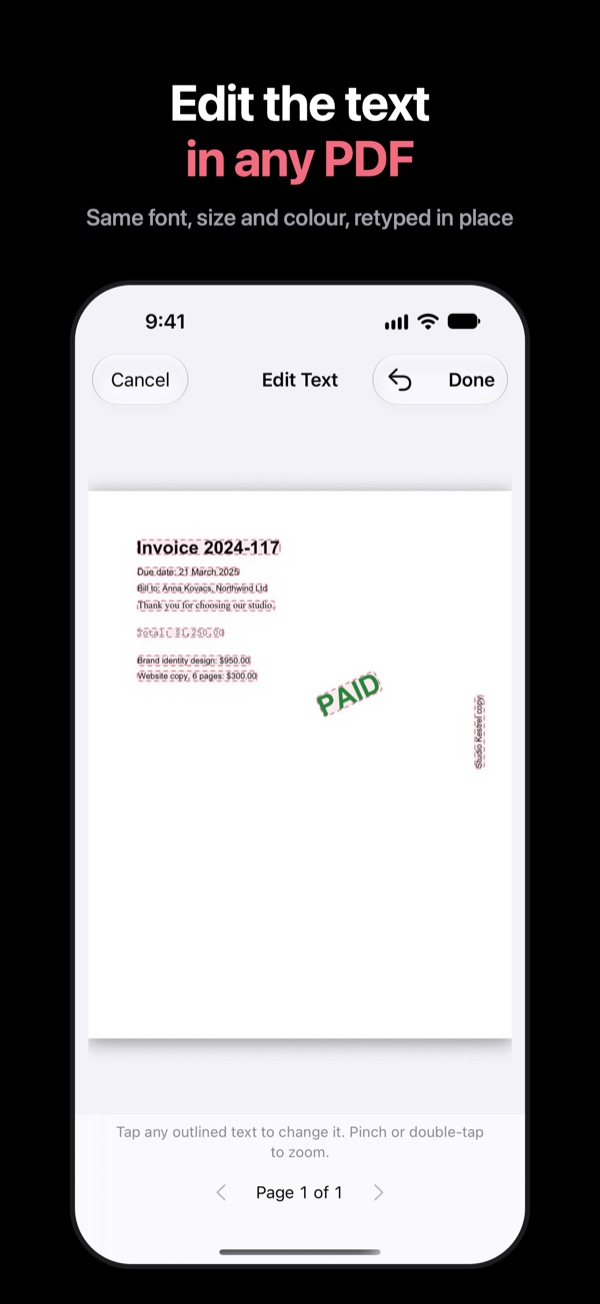
Edit the text
in any PDF.

Retype the words in a PDF in the same font, size and colour. Then merge, compress, sign, convert and protect it, or scan new paper, with 23 tools in one app. Everything happens on your iPhone.

Coming soon on theApp Store Free to download. Everyday tools stay free.
Files never uploaded No account No ads, no tracking
Edit Text
Invoice 2024-117 Due date: 21 March 2025 Bill to: Ana Kovač, Northwind Ltd Thank you for choosing our studio. Brand identity design: $950.00 Website copy, 6 pages: $300.00 Total due: $1,250.00 PAID Studio Kestrel copy
Tap any outlined text to change it.
Every PDF tool

23 tools. One app.

The everyday ones are free, with no watermark and no limits. Pro unlocks the advanced ones.

Edit Text

Change the words. Keep the look.

Tap a line or a paragraph and retype it. PDF Editor writes your change back in the document's own font, so the page looks untouched.

  • Same font, size and colour, with alignment (justified too), letter spacing and kerning kept.
  • Paragraphs rewrap, and text below moves down when a paragraph grows.
  • Bold words, colours and superscripts stay as they were.
  • Rotated and angled text can be edited too.
  • Undo, and pinch or double-tap to zoom.

If the document's embedded font doesn't include a letter you type, PDF Editor uses the closest matching iPhone font for it. Edit Text is part of Pro.

PDF Editor's Edit Text screen showing an invoice with every text block outlined
Scan and keep going

From paper to a finished PDF.

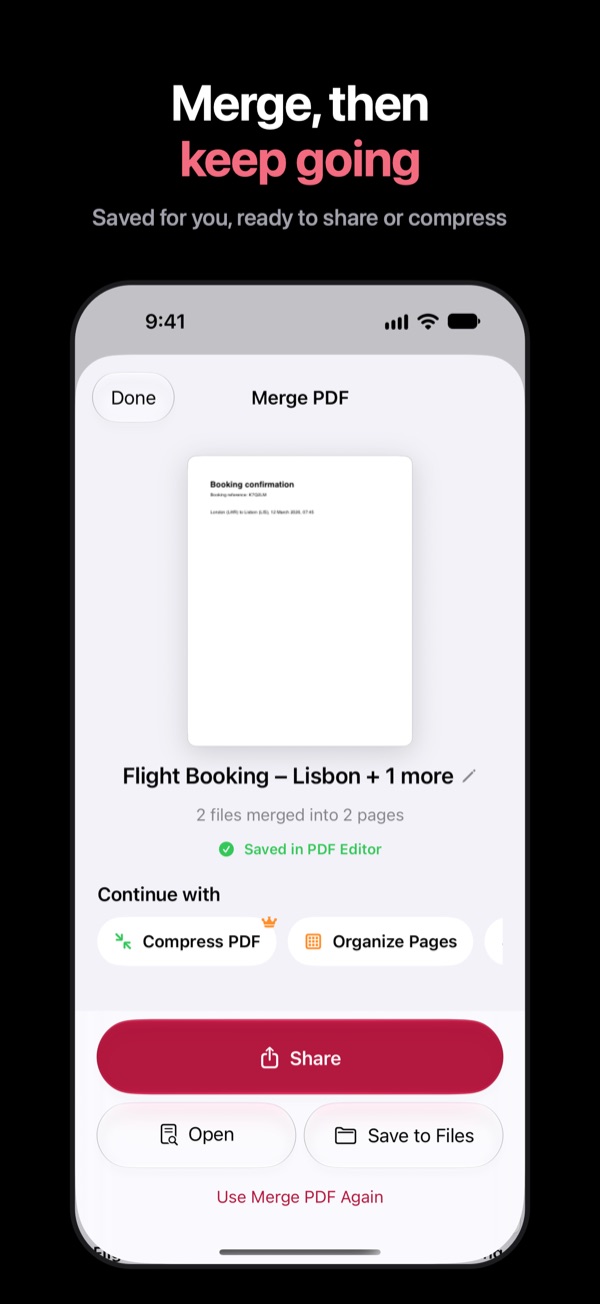
Scan with automatic edge detection, import from Files or Photos, or open a PDF from any app. Every result is saved for you.

  • Scanner built in: multi-page scans with enhancement filters, made searchable with on-device text recognition.
  • Continue with: run the next tool on a result straight away, like merge, then compress, then sign.
  • Your choice of output: preview, rename, share, save to Files, or replace the original.
  • Dropbox, Google Drive and OneDrive files open through the iPhone Files picker, if you have those apps.
A merged PDF saved in PDF Editor with options to share or compress next
Smart filing

It reads your paperwork.

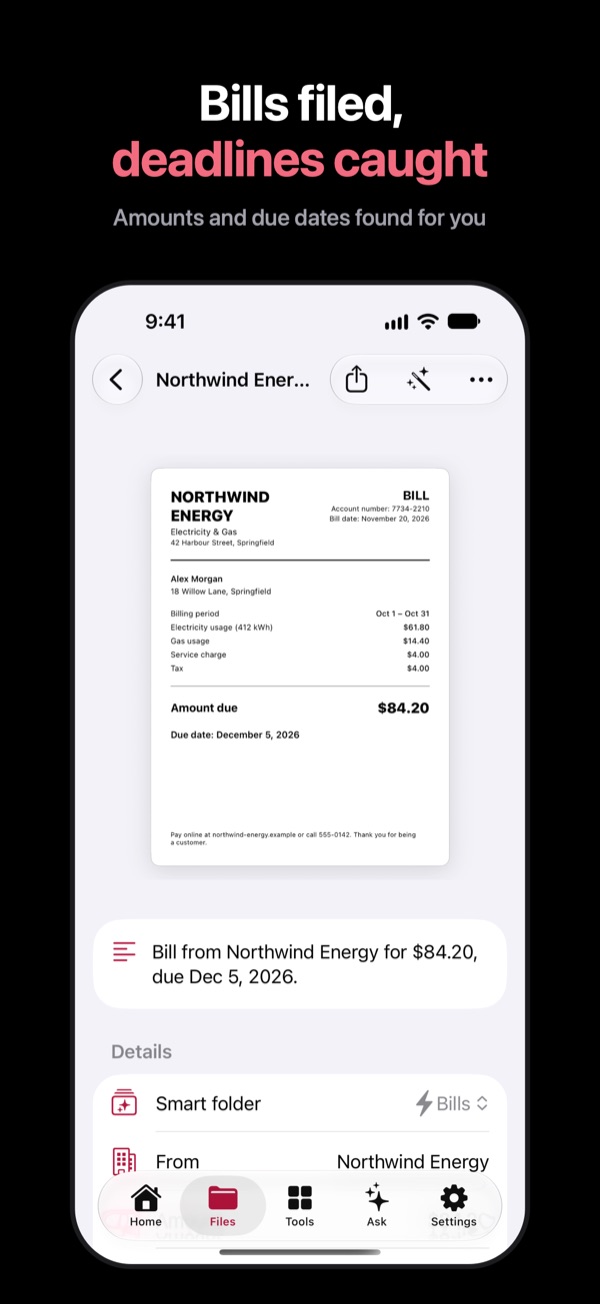
Scan a bill, receipt or ID and PDF Editor files it for you, finds the amount and the dates, and can remind you before anything is due.

BillsReceiptsIDs & PassportsWarrantiesInsuranceMedicalTaxBank & FinanceContractsLetters
  • Details found for you: merchant, amount, document date, due date, expiry date and a one-line summary.
  • Reminders before a due or expiry date, as notifications on your iPhone.
  • Ask questions about your own documents, answered on the device.

Smart details are free for your first 5 scans; after that, scans are still saved and searchable, and Pro unlocks the details. Ask includes 3 free questions. On iPhones with Apple Intelligence, summaries and answers use Apple's on-device model; on other iPhones, built-in rules find the details.

A scanned bill with its amount and due date found automatically
Private by design

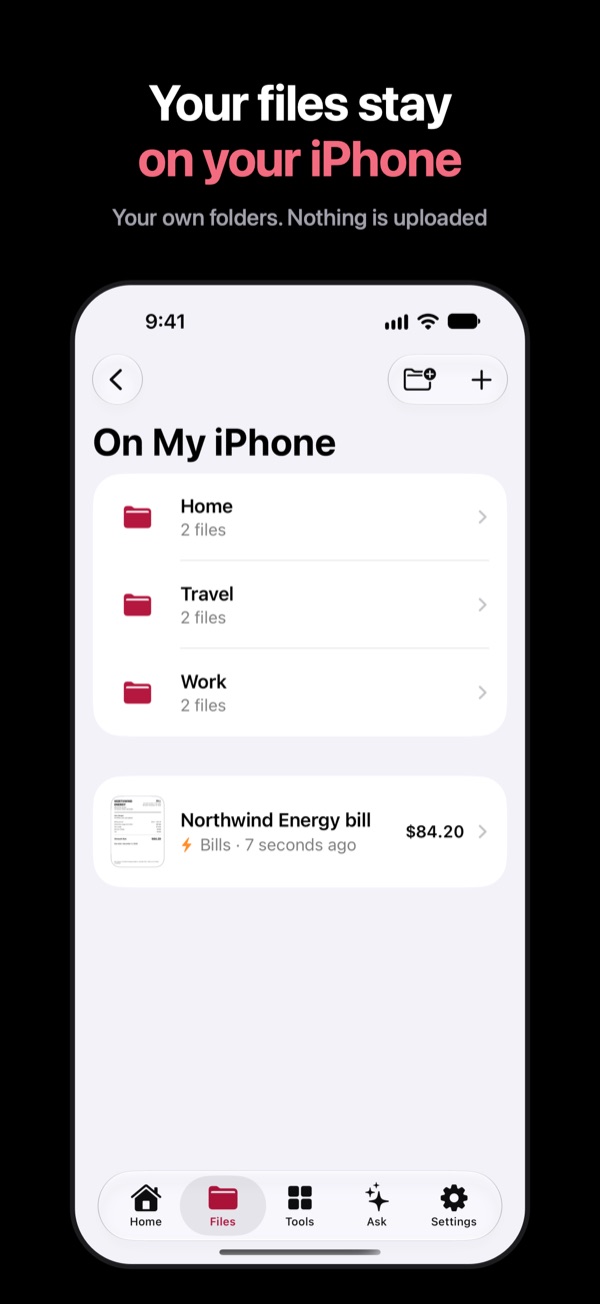
Your files stay on your iPhone.

Every tool, text recognition and AI run on the device. Your documents are never uploaded, to us or to anyone else.

No account

Nothing to sign up for. Open the app and start.

No ads

No ad SDKs, no analytics, no tracking.

Your folders

Visible in the Files app under On My iPhone › PDF Editor.

  • Bin for 30 days: deleted files can be brought back for 30 days, then they're erased.
  • Face ID lock keeps IDs and private documents behind Face ID or your passcode (Pro).
  • The only network use: the App Store for subscriptions, and the website you choose to save with Web Page to PDF.

Read the Privacy Policy.

PDF Editor's Files tab with the user's own folders stored on the iPhone
Pricing

Free to start. No weekly plans.

Scanning, merging, splitting and converting stay free. Pro unlocks every tool and removes the limits.

Free

Everything you need for everyday PDFs.

  • Unlimited scanning, text recognition and search
  • 11 tools: Merge, Split, Organize Pages, Rotate, Images to PDF, PDF to JPG, Web Page to PDF, Repair, Annotate, Fill Forms, Flatten
  • No watermark and no usage limits on free tools
  • Smart details on your first 5 scans
  • 3 Ask questions
$0

PDF Editor Pro PRO

Every tool, with no limits.

  • Edit Text, Sign, Compress, Protect and Unlock
  • OCR, Redact, Watermark, Page Numbers, PDF/A, Crop and Compare
  • Smart details and reminders on every scan
  • Unlimited Ask
  • Face ID lock
Yearly Save 41%3-day free trial for new subscribers $34.99a year · about $2.92/mo
MonthlyBilled every month $4.99a month

No ads. No weekly plans. Scanning, merging, splitting and converting stay free.

Prices are US prices in USD. The App Store shows the price in your currency before you subscribe.

Payment is charged to your Apple Account. Subscriptions renew automatically unless cancelled at least 24 hours before the end of the current period. Cancel anytime in Settings › your name › Subscriptions, or from Settings › Manage Subscription in the app. If you cancel during the free trial, you won't be charged.

See the Terms of Use and the Refund & Cancellation Policy.

FAQ

Questions, answered.

Are my documents uploaded anywhere?

No. Every tool, text recognition and AI feature runs on your iPhone or iPad. We never receive your files. They're only sent somewhere when you share or save them yourself.

Do I need an account?

No. There's no sign-up and no sign-in. Your subscription is tied to your Apple Account.

Which tools are free?

Merge, Split, Organize Pages, Rotate, Images to PDF, PDF to JPG, Web Page to PDF, Repair, Annotate, Fill Forms and Flatten, plus unlimited scanning and search. Free tools have no watermark and no usage limits.

Does Edit Text really keep the original font?

Yes. Your new words are written with the font, size and colour already in the document. If that font doesn't contain a letter you type, the closest matching iPhone font is used for that letter.

Where are my files stored?

On your device, in the app's own folder, which you can also open in the Files app under On My iPhone › PDF Editor. They're included in your normal iPhone backups. If you delete the app, its files are deleted too, so keep a backup of anything important.

Is the Sign tool a legally binding signature?

Sign PDF places your drawn or image signature on the page. It isn't a certificate-based digital signature. Whether a signed document is accepted depends on the law where you are and on the other party.

Do I need Apple Intelligence?

No. Every tool works on any supported iPhone. Apple Intelligence adds AI summaries and answers for smart filing and Ask; without it, built-in rules find amounts and dates.

How do I cancel or get a refund?

Cancel in Settings › your name › Subscriptions, or from Manage Subscription in the app. Refunds for App Store purchases are handled by Apple. See the Refund & Cancellation Policy.

Is there an Android, Mac or web version?

Not yet. PDF Editor is for iPhone and iPad.

PDF Editor app icon

Every PDF tool in your pocket.

PDF Editor is coming soon to the App Store for iPhone and iPad. Questions? Visit Support.

Coming soon on theApp Store